Iconclaw is a large-hand gaming mouse option for people who want generous palm support, a relaxed grip and useful controls within easy reach. The Corsair Ironclaw is not designed to be the lightest mouse on the desk. Instead, it focuses on comfort, stability and a roomy right-handed shape. This guide explains where that design works well, where the extra weight may become frustrating and which alternatives make more sense for different budgets, hand sizes and gaming styles.

What actually matters when choosing an Ironclaw-style mouse
A high DPI number is easy to advertise, but it does not tell you whether a computer mouse will feel good after two hours. Shape, weight distribution, grip support, sensor consistency, click feel, wireless stability and software are far more noticeable in everyday use.
The Ironclaw’s biggest strength is simple: it gives a larger hand somewhere to rest. Its wide body and raised rear section can reduce the cramped feeling that compact mice create. That same body also makes it heavy, so it will not suit everyone. A palm-grip MMO player and a low-sensitivity Valorant player may look at the same mouse and reach completely different conclusions. You can also explore more practical gaming gear reviews on Reviora Hub.
Quick comparison
| Mouse | Best for | Main advantage | Main drawback |
|---|---|---|---|
| Corsair Ironclaw RGB Wireless | Large-hand palm grip | Roomy shape and 10 buttons | Heavy at roughly 130 g |
| 2.4GHz Wireless 2000 DPI | Very low budget | Simple wireless use | Key specifications are unclear |
| ATTACK SHARK R5 Ultra | Competitive FPS | 39 g body and modern sensor | Little palm support |
| Honeycomb Wired 7200 DPI | Cheap wired setup | No charging required | Unknown sensor quality |
| UTHAI DB20 Car Mouse | Novelty and gifts | Distinctive design | Weak gaming ergonomics |
| Razer DeathAdder V2 X HyperSpeed | Wireless ergonomic value | Comfortable lighter shape | No wired mode |
| SteelSeries Rival 300S | Classic large wired feel | Stable palm-grip body | Older model |
| SteelSeries Prime Mini Wireless | Compact wireless FPS | Light and responsive | Small for large-hand palm grip |
| SteelSeries Aerox 3 Wired | Light wired FPS | 59 g branded option | Perforated shell |
| Razer DeathAdder Essential | Budget palm grip | Proven ergonomic shape | Basic wired feature set |
Which mouse fits your hand, games and budget?
Rather than treating every product as a direct competitor, the reviews below explain what each one does well, what it gives up and who is most likely to enjoy it.
#1
Corsair Ironclaw RGB Wireless
The Ironclaw feels noticeably roomier than most gaming mice. Its tall, broad shell gives the palm somewhere to rest, which is exactly why many large-handed users keep coming back to it. The trade-off is equally obvious: at around 130 grams, it feels solid rather than feather-light.
How it feels in real use
For relaxed palm grip, long MMO sessions, strategy games and everyday work, that extra size can be a real advantage. The mouse does not force long fingers into a tight curl, and the ten programmable buttons are useful beyond gaming. In fast, low-sensitivity shooters, however, repeated flicks and direction changes require more effort than they would on a modern ultralight mouse.
What works well
- Excellent palm support for larger hands
- Useful number of programmable buttons
- Three practical connection options
- Stable, accurate feel for mixed gaming
What to consider
- Heavy for rapid FPS movement
- Designed only for right-handed use
- Not ideal for fingertip grip
- Availability and local pricing vary
Best for: Large or medium-large hands, palm grip, MMO/MOBA play and long mixed-use sessions.
Skip it if: Players who want an ultralight mouse, left-handed users and dedicated fingertip-grip players.
 #2
#2
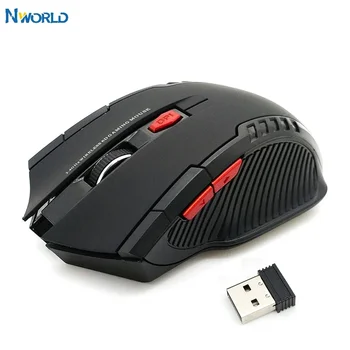
2.4GHz Wireless Mouse with USB Receiver
This is the kind of mouse people consider when the budget is extremely tight. It offers basic 2.4 GHz wireless use and a seller-stated maximum of 2000 DPI, but it should be viewed as an inexpensive everyday mouse rather than a true Ironclaw replacement.
How it feels in real use
For browsing, schoolwork, office tasks and occasional casual games, the feature set may be enough. The uncertainty comes from what the listing does not explain: the sensor model, polling rate, switch quality, battery behaviour and software support. Those missing details matter far more in competitive games than a large DPI number on the product title.
What works well
- Very low purchase price
- Simple plug-and-play receiver
- No cable across the desk
- Suitable as a backup mouse
What to consider
- Sensor and polling rate are unclear
- No confirmed software support
- Limited ergonomic information
- Not a strong choice for ranked FPS
Best for: Backup computers, casual gaming, office use and buyers with a strict budget.
Skip it if: Competitive players or anyone who wants verified parts and dependable long-term support.
 #3
#3
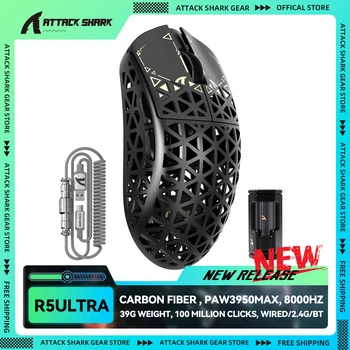
ATTACK SHARK R5 Ultra
The R5 Ultra takes the opposite approach to the Ironclaw. Instead of filling the hand with a heavy ergonomic shell, it keeps weight close to 39 grams and focuses on fast movement, low inertia and high polling-rate support.
How it feels in real use
That difference is immediately relevant for competitive FPS players. Broad swipes and quick corrections demand less effort, while the PAW3950MAX sensor provides more performance headroom than most users will ever need. The 8K mode is impressive on paper, but many players will still prefer 1000 or 2000 Hz for better battery life and lighter CPU use.
What works well
- Exceptionally low weight
- Modern high-end sensor
- Flexible tri-mode connection
- Strong fit for fast competitive games
What to consider
- Open shell needs more cleaning
- Less supportive for large-hand palm grip
- 8K mode is unnecessary for many PCs
- Marketplace warranty should be checked
Best for: Competitive FPS, claw grip, fingertip grip and users who value speed over palm support.
Skip it if: Buyers who want a broad, solid shell with a planted and substantial feel.
 #4
#4
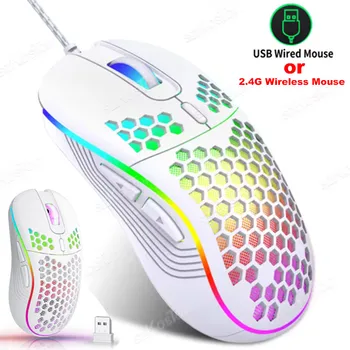
Honeycomb Wired RGB 7200 DPI Mouse
This generic honeycomb mouse aims to deliver the look of a lightweight gaming model without the higher price. It uses a wired USB connection, advertises adjustable sensitivity up to 7200 DPI and adds RGB lighting for a more typical gaming setup.
How it feels in real use
The wired design removes battery worries and should make setup straightforward. Still, the headline DPI figure does not tell us whether the sensor tracks cleanly at high speed. Because the sensor model, switches and true polling rate are not clearly identified, it makes more sense for casual play than serious competitive use.
What works well
- No charging or receiver required
- Light-looking perforated shell
- Adjustable sensitivity
- Affordable RGB appearance
What to consider
- Sensor model is not identified
- Cable may create drag
- Open shell collects dust
- Durability depends on the seller
Best for: Casual wired gaming and buyers who care more about price and appearance than premium components.
Skip it if: Players who need proven competitive tracking or reliable after-sales service.
 #5
#5
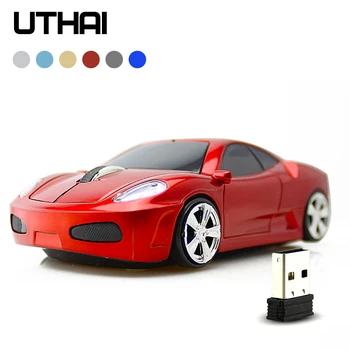
UTHAI DB20 Wireless Car Mouse
The DB20 is mainly about its car-shaped body. It can make a fun desk accessory or a playful gift, but the unusual shape is not designed around the same comfort and control priorities as a proper gaming mouse.
How it feels in real use
For light browsing and occasional use, it may be perfectly enjoyable. During longer sessions, however, styling can work against natural hand placement. Buyers should choose it because they like the design, not because they expect Ironclaw-level ergonomics or dependable competitive performance.
What works well
- Distinctive gift-friendly design
- Wireless desk setup
- Simple everyday operation
- Fun option for younger users
What to consider
- Shape is not performance-focused
- Limited palm support
- Technical specifications are sparse
- Poor fit for competitive gaming
Best for: Gifts, children’s desks, collectors and occasional office use.
Skip it if: Ranked gamers, large-hand palm users and anyone prioritising dependable ergonomics.
 #6
#6
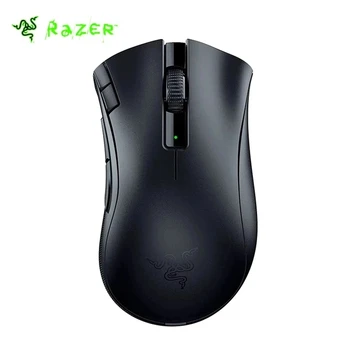
Razer DeathAdder V2 X HyperSpeed
For shoppers who like the Ironclaw’s right-handed comfort but want a lighter and simpler wireless mouse, the DeathAdder V2 X HyperSpeed is one of the most sensible alternatives. Its familiar ergonomic shell works well with palm or relaxed claw grip.
How it feels in real use
The mouse feels less bulky than the Ironclaw while still offering enough length and height for many medium-to-large hands. Replaceable AA or AAA batteries also mean there is no need to stop and recharge an internal cell. The downside is that it does not provide a wired fallback, and the battery choice affects the final balance and weight.
What works well
- Comfortable proven ergonomic shape
- Strong battery-life potential
- Easy battery replacement
- Good balance of size and weight
What to consider
- No wired mode
- Battery adds weight
- Fewer controls than the Ironclaw
- Still unsuitable for left-handed users
Best for: Medium-to-large hands, palm grip, relaxed claw grip and users who dislike charging cables.
Skip it if: Buyers who require wired fallback or an internal rechargeable battery.
 #7
#7
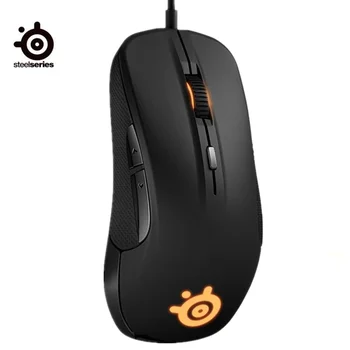
SteelSeries Rival 300S
The Rival 300S comes from an older school of gaming-mouse design: a large right-handed body, a wired connection and a shape that favours palm support over minimal weight.
How it feels in real use
Its roomy profile can still feel comfortable for larger hands, particularly for users who prefer a stable mouse and do not mind a cable. Age is the main concern. Stock may be old, regional warranty coverage may be limited and newer mice often offer lower weight or improved wireless options.
What works well
- Comfortable large-hand shape
- No battery management
- Simple wired reliability
- Good for steady palm grip
What to consider
- Older model
- Heavier than modern FPS mice
- No wireless option
- Warranty may depend on seller
Best for: Palm-grip players who want a traditional large wired gaming mouse.
Skip it if: Buyers looking for low weight, modern wireless features or current local warranty support.
 #8
#8
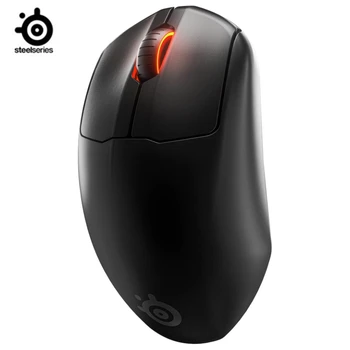
SteelSeries Prime Mini Wireless
The Prime Mini Wireless is not a direct shape match for the Ironclaw. It is smaller, lighter and more focused on competitive control, making it better suited to claw grip and users who find large ergonomic mice too bulky.
How it feels in real use
At roughly 73 grams, it is much easier to accelerate and stop than the Ironclaw. Its compact shell can work beautifully for small or medium hands, but large-handed palm users may feel that the body disappears under the hand and leaves too little support.
What works well
- Light and easy to control
- Strong battery-life claim
- Compact competitive shape
- Named gaming-grade sensor
What to consider
- Too small for many large hands
- Limited macro buttons
- Not as supportive for palm grip
- Usually costs more than basic wired options
Best for: Small-to-medium hands, claw grip and wireless FPS play.
Skip it if: Large-hand palm users and MMO players who need many side buttons.
 #9
#9
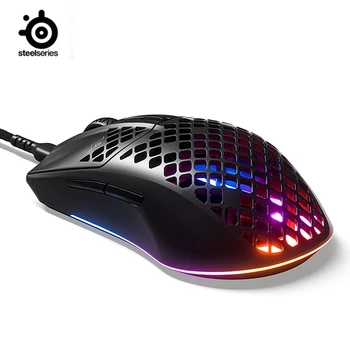
SteelSeries Aerox 3 Wired
The Aerox 3 Wired is a practical middle ground for players who want a light mouse from an established gaming brand but do not need wireless connectivity.
How it feels in real use
Its 59-gram body makes wide swipes and rapid corrections much easier than on the Ironclaw. The perforated shell and flatter profile favour claw grip more than relaxed full-palm support, so the choice depends less on specifications and more on how you hold the mouse.
What works well
- Very light for a wired mouse
- Established-brand feature set
- No battery concerns
- Good fit for quick FPS movement
What to consider
- Perforated shell is not for everyone
- Cable remains on the desk
- Less palm support than Ironclaw
- Few extra controls
Best for: Wired FPS players, claw grip and buyers who want low weight without moving to wireless.
Skip it if: Users who dislike open shells or need a broad ergonomic palm rest.
 #10
#10
Razer DeathAdder Essential
The DeathAdder Essential is a straightforward choice for buyers who want a recognised ergonomic shape without paying for wireless features or a high-end sensor.
How it feels in real use
Its broad right-handed body suits many medium-to-large hands and feels natural with palm grip. It is not especially light and it offers fewer buttons than the Ironclaw, but the simple wired design is easy to understand, easy to power and usually easier to replace.
What works well
- Comfortable palm-grip shape
- Recognised brand design
- No charging required
- Good value for everyday gaming
What to consider
- No wireless mode
- Limited extra buttons
- Not an ultralight mouse
- Basic feature set
Best for: Budget palm grip, medium-to-large hands and users who want a familiar branded shape.
Skip it if: Wireless-only shoppers, ultralight enthusiasts and MMO players who need many macros.
How to choose without getting distracted by marketing numbers
Start with shape
A mouse that matches your hand and grip will usually feel better than a technically faster mouse that forces your fingers into an awkward position.
Match weight to your games
Heavier mice feel planted and controlled. Lighter mice are easier to accelerate, stop and reposition during fast shooters.
Check the real connection options
Do not assume “wireless” includes Bluetooth, low-latency 2.4 GHz and wired play. Many models offer only one or two of those modes.
Look beyond DPI
Polling rate, sensor consistency, lift-off behaviour and software matter more than a huge maximum DPI number that you may never use.
Confirm seller protection
For marketplace products, read recent reviews and check return terms, warranty coverage, product condition and included accessories.
Think about long sessions
Comfort problems often appear after an hour, not during the first minute. Palm support, side texture and button placement deserve serious attention.
Ironclaw gaming mouse FAQ
These answers focus on the practical questions that usually decide whether the Ironclaw is the right mouse—or whether a lighter alternative would be a better fit.
Yes. Its broad rear section, tall profile and generous palm support are the main reasons to consider it. People with long fingers often find it less cramped than compact esports mice.
It depends on your style. The mouse can track accurately, but its roughly 130-gram weight takes more effort to start, stop and reverse. Players who use low sensitivity and make frequent wide swipes usually prefer something lighter.
Yes. The RGB Wireless version supports a low-latency 2.4 GHz connection and Bluetooth. It can also be used through USB when needed.
The Corsair Ironclaw RGB Wireless has ten programmable buttons. They can be useful for game commands, media controls, editing shortcuts and everyday productivity.
The Ironclaw usually feels roomier and more palm-focused, while the G502 Hero offers a different sculpted shape and an adjustable-weight system. The better choice comes down to hand shape, preferred button placement and whether you want wireless use.
For a similar right-handed ergonomic feel at a lower weight, the Razer DeathAdder V2 X HyperSpeed is the strongest all-round alternative in this list. Large-handed competitive players may also consider a lighter claw-grip model, but it will feel less supportive.
A relaxed claw grip can work for some medium-to-large hands, but the mouse is mainly shaped for palm grip. Fingertip players will usually find it too large and heavy.
No. Most players use a much lower sensitivity. The more important questions are whether the sensor tracks consistently, whether the shape fits your hand and whether the weight suits your games.
It can be fine for casual play or as a backup, but it is rarely a true replacement. Generic listings often leave out the sensor model, polling rate, switch quality, software support and warranty details.
The ATTACK SHARK R5 Ultra offers the lowest weight and highest performance ceiling in this comparison. The SteelSeries Aerox 3 Wired is a simpler alternative for players who prefer a cable and a known gaming brand.
The Razer DeathAdder Essential is the budget wired choice, while the DeathAdder V2 X HyperSpeed is the stronger wireless value pick. The Ironclaw remains the better choice when a larger shell and extra buttons matter most.
Confirm the exact model, seller rating, return policy, warranty provider, included receiver or cable, product condition and current specifications. Do not rely only on the title image or advertised DPI.
Should you buy the Ironclaw?
Buy the Corsair Ironclaw RGB Wireless when your priorities are a large palm-grip shape, generous hand support, useful programmable buttons and flexible connectivity. Its weight is not a hidden flaw; it is the central trade-off. Some players will appreciate the stable, substantial feel, while fast-FPS users may find it tiring.
The Razer DeathAdder V2 X HyperSpeed is the strongest ergonomic wireless alternative for most medium-to-large hands. The DeathAdder Essential is the practical wired budget pick. For competitive FPS, the ATTACK SHARK R5 Ultra offers the lowest weight and highest performance ceiling, while the Aerox 3 Wired is a safer light wired option from an established brand.
The cheapest generic mice and the DB20 car mouse serve different purposes. They may satisfy a tight budget, a visual preference or a gift idea, but they should not be treated as equal replacements for a well-specified gaming mouse.
Best all-round affiliate alternative
Razer DeathAdder V2 X HyperSpeed

No comments:
Post a Comment